<canvas>
elements, it's also very easy to make (interactive) animations. In this chapter we will take a look at how to do some basic animations.
Probably the biggest limitation is, that once a shape gets drawn, it stays that way. If we need to move it we have to redraw it and everything that was drawn before it. It takes a lot of time to redraw complex frames and the performance depends highly on the speed of the computer it's running on.
These are the steps you need to take to draw a frame:
clearRect()
方法。
Shapes are drawn to the canvas by using the canvas methods directly or by calling custom functions. In normal circumstances, we only see these results appear on the canvas when the script finishes executing. For instance, it isn't possible to do an animation from within a
for
循环。
That means we need a way to execute our drawing functions over a period of time. There are two ways to control an animation like this.
First there's the
window.setInterval()
,
window.setTimeout()
,和
window.requestAnimationFrame()
functions, which can be used to call a specific function over a set period of time.
setInterval(function, delay)
function
every
delay
毫秒。
setTimeout(function, delay)
function
in
delay
毫秒。
requestAnimationFrame(callback)
Tells the browser that you wish to perform an animation and requests that the browser call a specified function to update an animation before the next repaint.
If you don't want any user interaction you can use the
setInterval()
function which repeatedly executes the supplied code. If we wanted to make a game, we could use keyboard or mouse events to control the animation and use
setTimeout()
. By setting
EventListener
s, we catch any user interaction and execute our animation functions.
In the examples below, we'll use the
window.requestAnimationFrame()
method to control the animation. The
requestAnimationFrame
method provides a smoother and more efficient way for animating by calling the animation frame when the system is ready to paint the frame. The number of callbacks is usually 60 times per second and may be reduced to a lower rate when running in background tabs. For more information about the animation loop, especially for games, see the article
Anatomy of a video game
in our
Game development zone
.
This example animates a small model of our solar system.
var sun = new Image();
var moon = new Image();
var earth = new Image();
function init() {
  sun.src = 'https://mdn.mozillademos.org/files/1456/Canvas_sun.png';
  moon.src = 'https://mdn.mozillademos.org/files/1443/Canvas_moon.png';
  earth.src = 'https://mdn.mozillademos.org/files/1429/Canvas_earth.png';
  window.requestAnimationFrame(draw);
}
function draw() {
  var ctx = document.getElementById('canvas').getContext('2d');
  ctx.globalCompositeOperation = 'destination-over';
  ctx.clearRect(0, 0, 300, 300); // clear canvas
  ctx.fillStyle = 'rgba(0, 0, 0, 0.4)';
  ctx.strokeStyle = 'rgba(0, 153, 255, 0.4)';
  ctx.save();
  ctx.translate(150, 150);
  // Earth
  var time = new Date();
  ctx.rotate(((2 * Math.PI) / 60) * time.getSeconds() + ((2 * Math.PI) / 60000) * time.getMilliseconds());
  ctx.translate(105, 0);
  ctx.fillRect(0, -12, 40, 24); // Shadow
  ctx.drawImage(earth, -12, -12);
  // Moon
  ctx.save();
  ctx.rotate(((2 * Math.PI) / 6) * time.getSeconds() + ((2 * Math.PI) / 6000) * time.getMilliseconds());
  ctx.translate(0, 28.5);
  ctx.drawImage(moon, -3.5, -3.5);
  ctx.restore();
  ctx.restore();
  ctx.beginPath();
  ctx.arc(150, 150, 105, 0, Math.PI * 2, false); // Earth orbit
  ctx.stroke();
  ctx.drawImage(sun, 0, 0, 300, 300);
  window.requestAnimationFrame(draw);
}
init();
<canvas id="canvas" width="300" height="300"></canvas>
| Screenshot | Live sample |
|---|---|

|
This example draws an animated clock, showing your current time.
function clock() {
  var now = new Date();
  var ctx = document.getElementById('canvas').getContext('2d');
  ctx.save();
  ctx.clearRect(0, 0, 150, 150);
  ctx.translate(75, 75);
  ctx.scale(0.4, 0.4);
  ctx.rotate(-Math.PI / 2);
  ctx.strokeStyle = 'black';
  ctx.fillStyle = 'white';
  ctx.lineWidth = 8;
  ctx.lineCap = 'round';
  // Hour marks
  ctx.save();
  for (var i = 0; i < 12; i++) {
    ctx.beginPath();
    ctx.rotate(Math.PI / 6);
    ctx.moveTo(100, 0);
    ctx.lineTo(120, 0);
    ctx.stroke();
  }
  ctx.restore();
  // Minute marks
  ctx.save();
  ctx.lineWidth = 5;
  for (i = 0; i < 60; i++) {
    if (i % 5!= 0) {
      ctx.beginPath();
      ctx.moveTo(117, 0);
      ctx.lineTo(120, 0);
      ctx.stroke();
    }
    ctx.rotate(Math.PI / 30);
  }
  ctx.restore();
  var sec = now.getSeconds();
  var min = now.getMinutes();
  var hr  = now.getHours();
  hr = hr >= 12 ? hr - 12 : hr;
  ctx.fillStyle = 'black';
  // write Hours
  ctx.save();
  ctx.rotate(hr * (Math.PI / 6) + (Math.PI / 360) * min + (Math.PI / 21600) *sec);
  ctx.lineWidth = 14;
  ctx.beginPath();
  ctx.moveTo(-20, 0);
  ctx.lineTo(80, 0);
  ctx.stroke();
  ctx.restore();
  // write Minutes
  ctx.save();
  ctx.rotate((Math.PI / 30) * min + (Math.PI / 1800) * sec);
  ctx.lineWidth = 10;
  ctx.beginPath();
  ctx.moveTo(-28, 0);
  ctx.lineTo(112, 0);
  ctx.stroke();
  ctx.restore();
  // Write seconds
  ctx.save();
  ctx.rotate(sec * Math.PI / 30);
  ctx.strokeStyle = '#D40000';
  ctx.fillStyle = '#D40000';
  ctx.lineWidth = 6;
  ctx.beginPath();
  ctx.moveTo(-30, 0);
  ctx.lineTo(83, 0);
  ctx.stroke();
  ctx.beginPath();
  ctx.arc(0, 0, 10, 0, Math.PI * 2, true);
  ctx.fill();
  ctx.beginPath();
  ctx.arc(95, 0, 10, 0, Math.PI * 2, true);
  ctx.stroke();
  ctx.fillStyle = 'rgba(0, 0, 0, 0)';
  ctx.arc(0, 0, 3, 0, Math.PI * 2, true);
  ctx.fill();
  ctx.restore();
  ctx.beginPath();
  ctx.lineWidth = 14;
  ctx.strokeStyle = '#325FA2';
  ctx.arc(0, 0, 142, 0, Math.PI * 2, true);
  ctx.stroke();
  ctx.restore();
  window.requestAnimationFrame(clock);
}
window.requestAnimationFrame(clock);
<canvas id="canvas" width="150" height="150"></canvas>
| Screenshot | Live sample |
|---|---|

|
In this example, a panorama is scrolled left-to-right. We're using an image of Yosemite National Park we took from Wikipedia, but you could use any image that's larger than the canvas.
var img = new Image();
// User Variables - customize these to change the image being scrolled, its
// direction, and the speed.
img.src = 'https://mdn.mozillademos.org/files/4553/Capitan_Meadows,_Yosemite_National_Park.jpg';
var CanvasXSize = 800;
var CanvasYSize = 200;
var speed = 30; // lower is faster
var scale = 1.05;
var y = -4.5; // vertical offset
// Main program
var dx = 0.75;
var imgW;
var imgH;
var x = 0;
var clearX;
var clearY;
var ctx;
img.onload = function() {
    imgW = img.width * scale;
    imgH = img.height * scale;
    if (imgW > CanvasXSize) {
        // image larger than canvas
        x = CanvasXSize - imgW;
    }
    if (imgW > CanvasXSize) {
        // image width larger than canvas
        clearX = imgW;
    } else {
        clearX = CanvasXSize;
    }
    if (imgH > CanvasYSize) {
        // image height larger than canvas
        clearY = imgH;
    } else {
        clearY = CanvasYSize;
    }
    // get canvas context
    ctx = document.getElementById('canvas').getContext('2d');
    // set refresh rate
    return setInterval(draw, speed);
}
function draw() {
    ctx.clearRect(0, 0, clearX, clearY); // clear the canvas
    // if image is <= Canvas Size
    if (imgW <= CanvasXSize) {
        // reset, start from beginning
        if (x > CanvasXSize) {
            x = -imgW + x;
        }
        // draw additional image1
        if (x > 0) {
            ctx.drawImage(img, -imgW + x, y, imgW, imgH);
        }
        // draw additional image2
        if (x - imgW > 0) {
            ctx.drawImage(img, -imgW * 2 + x, y, imgW, imgH);
        }
    }
    // image is > Canvas Size
    else {
        // reset, start from beginning
        if (x > (CanvasXSize)) {
            x = CanvasXSize - imgW;
        }
        // draw aditional image
        if (x > (CanvasXSize-imgW)) {
            ctx.drawImage(img, x - imgW + 1, y, imgW, imgH);
        }
    }
    // draw image
    ctx.drawImage(img, x, y,imgW, imgH);
    // amount to move
    x += dx;
}
Below is the
<canvas>
in which the image is scrolled. Note that the width and height specified here must match the values of the
CanvasXZSize
and
CanvasYSize
variables in the JavaScript code.
<canvas id="canvas" width="800" height="200"></canvas>
<!DOCTYPE html>
<html lang="en">
    <head>
        <meta charset="UTF-8">
        <meta name="viewport" content="width=device-width, initial-scale=1.0">
        <meta http-equiv="X-UA-Compatible" content="ie=edge">
        <title>Document</title>
        <script>
            var cn;
            //= document.getElementById('cw');
            var c;
            var u = 10;
            const m = {
                x: innerWidth / 2,
                y: innerHeight / 2
            };
            window.onmousemove = function(e) {
                m.x = e.clientX;
                m.y = e.clientY;
            }
            function gc() {
                var s = "0123456789ABCDEF";
                var c = "#";
                for (var i = 0; i < 6; i++) {
                    c += s[Math.ceil(Math.random() * 15)]
                }
                return c
            }
            var a = [];
            window.onload = function myfunction() {
                cn = document.getElementById('cw');
                c = cn.getContext('2d');
                for (var i = 0; i < 10; i++) {
                    var r = 30;
                    var x = Math.random() * (innerWidth - 2 * r) + r;
                    var y = Math.random() * (innerHeight - 2 * r) + r;
                    var t = new ob(innerWidth / 2,innerHeight / 2,5,"red",Math.random() * 200 + 20,2);
                    a.push(t);
                }
                //cn.style.backgroundColor = "#700bc8";
                c.lineWidth = "2";
                c.globalAlpha = 0.5;
                resize();
                anim()
            }
            window.onresize = function() {
                resize();
            }
            function resize() {
                cn.height = innerHeight;
                cn.width = innerWidth;
                for (var i = 0; i < 101; i++) {
                    var r = 30;
                    var x = Math.random() * (innerWidth - 2 * r) + r;
                    var y = Math.random() * (innerHeight - 2 * r) + r;
                    a[i] = new ob(innerWidth / 2,innerHeight / 2,4,gc(),Math.random() * 200 + 20,0.02);
                }
                //  a[0] = new ob(innerWidth / 2, innerHeight / 2, 40, "red", 0.05, 0.05);
                //a[0].dr();
            }
            function ob(x, y, r, cc, o, s) {
                this.x = x;
                this.y = y;
                this.r = r;
                this.cc = cc;
                this.theta = Math.random() * Math.PI * 2;
                this.s = s;
                this.o = o;
                this.t = Math.random() * 150;
                this.o = o;
                this.dr = function() {
                    const ls = {
                        x: this.x,
                        y: this.y
                    };
                    this.theta += this.s;
                    this.x = m.x + Math.cos(this.theta) * this.t;
                    this.y = m.y + Math.sin(this.theta) * this.t;
                    c.beginPath();
                    c.lineWidth = this.r;
                    c.strokeStyle = this.cc;
                    c.moveTo(ls.x, ls.y);
                    c.lineTo(this.x, this.y);
                    c.stroke();
                    c.closePath();
                }
            }
            function anim() {
                requestAnimationFrame(anim);
                c.fillStyle = "rgba(0,0,0,0.05)";
                c.fillRect(0, 0, cn.width, cn.height);
                a.forEach(function(e, i) {
                    e.dr();
                });
            }
        </script>
        <style>
            #cw {
                position: fixed;
                z-index: -1;
            }
            body {
                margin: 0;
                padding: 0;
                background-color: rgba(0,0,0,0.05);
            }
        </style>
    </head>
    <body>
        <canvas id="cw"></canvas>
    </body>
</html>

|
<!DOCTYPE html>
<html lang="en">
<head>
    <meta charset="UTF-8">
    <meta name="viewport" content="width=device-width,initial-scale=1">
    <meta http-equiv="X-UA-Compatible" content="ie=edge">
    <title>Nokia 1100:snake..Member berries</title>
</head>
<body>
    <div class="keypress hide">
        <div class="up" onclick="emit(38)">↑</div>
        <div class="right" onclick="emit(39)">→</div>
        <div class="left" onclick="emit(37)">←</div>
        <div class="down" onclick="emit(40)">↓</div>
    </div>
    <div class="banner" id="selector">
        <div>
            Time :<span id="time">0</span>
        </div>
        <div>LousyGames ©</div>
        <div>
            Score :<span id="score">0</span>
        </div>
        <div class="touch off" onclick="touch(this)">touch</div>
    </div>
    <canvas id="main"></canvas>
</body>
<style>
    body {
        margin: 0;
        overflow: hidden;
        background: #000
    }
    .banner {
        text-align: center;
        color: #fff;
        background: #3f51b5;
        line-height: 29px;
        position: fixed;
        left: 0;
        top: 0;
        right: 0;
        font-family: monospace;
        height: 30px;
        opacity: .4;
        display: flex;
        transition: .5s
    }
    .banner:hover {
        opacity: 1
    }
    div#selector>div {
        flex-basis: 30%
    }
    @keyframes diss {
        from {
            opacity: 1
        }
        to {
            opacity: 0
        }
    }
    .keypress>div {
        border: dashed 3px #fff;
        height: 48%;
        width: 48%;
        display: flex;
        align-content: center;
        justify-content: center;
        align-self: center;
        align-items: center;
        font-size: -webkit-xxx-large;
        font-weight: 900;
        color: #fff;
        transition: .5s;
        opacity: .1;
        border-radius: 7px
    }
    .keypress {
        position: fixed;
        width: 100vw;
        height: 100vh;
        top: 0;
        left: 0;
        display: flex;
        flex-wrap: wrap;
        justify-content: space-around;
        opacity: 1;
        user-select: none
    }
    .keypress>div:hover {
        opacity: 1
    }
    .touch {
        background: #8bc34a
    }
    .off {
        background: #f44336
    }
    .hide {
        opacity: 0
    }
</style>
</html>
Javascript
function tmz() {
        var e = new Date(t),
            i = new Date,
            n = Math.abs(i.getMinutes() - e.getMinutes()),
            o = Math.abs(i.getSeconds() - e.getSeconds());
        return n + " : " + o
    }
    function coll(t, e) {
        return t.x < e.x + e.w && t.x + t.w > e.x && t.y < e.y + e.h && t.h + t.y > e.y
    }
    function snake() {
        this.w = 15, this.h = 15, this.dx = 1, this.dy = 1, this.xf = 1, this.yf = 1, this.sn = [];
        for (var t = {
            x: w / 2,
            y: h / 2
        }, e = 0; e < 5; e++) this.sn.push(Object.assign({}, t)), t.x += this.w;
        this.draw = function () {
            var t = d && d.search("Arrow") > -1,
                e = -1;
            if (t) {
                var i = {
                    ...this.sn[0]
                };
                if ("ArrowUp" == d && (i.y -= this.h), "ArrowDown" == d && (i.y += this.h), "ArrowLeft" == d && (i.x -= this.w), "ArrowRight" == d && (i.x += this.w), i.x >= w ? i.x = 0 : i.x < 0 && (i.x = w - this.w), i.y > h ? i.y = 0 : i.y < 0 && (i.y = h), e = fa.findIndex(t => coll({
                    ...this.sn[0],
                    h: this.h,
                    w: this.w
                }, t)), this.sn.unshift(i), -1 != e) return console.log(e), fa[e].renew(), void (document.getElementById("score").innerText = Number(document.getElementById("score").innerText) + 1);
                this.sn.pop(), console.log(6)
            }
            this.sn.forEach((t, e, i) => {
                if (0 == e || i.length - 1 == e) {
                    var n = c.createLinearGradient(t.x, t.y, t.x + this.w, t.y + this.h);
                    i.length - 1 == e ? (n.addColorStop(0, "black"), n.addColorStop(1, "#8BC34A")) : (n.addColorStop(0, "#8BC34A"), n.addColorStop(1, "white")), c.fillStyle = n
                } else c.fillStyle = "#8BC34A";
                c.fillRect(t.x, t.y, this.w, this.h), c.strokeStyle = "#E91E63", c.font = "30px serif", c.strokeStyle = "#9E9E9E", i.length - 1 != e && 0 != e && c.strokeRect(t.x, t.y, this.w, this.h), 0 == e && (c.beginPath(), c.fillStyle = "#F44336", c.arc(t.x + 10, t.y + 2, 5, 360, 0), c.fill()), c.arc(t.x + 10, t.y + 2, 5, 360, 0), c.fill(), c.beginPath()
            })
        }
    }
    function gc() {
        for (var t = "0123456789ABCDEF", e = "#", i = 0; i < 6; i++) e += t[Math.ceil(15 * Math.random())];
        return e
    }
    function food() {
        this.x = 0, this.y = 0, this.b = 10, this.w = this.b, this.h = this.b, this.color = gc(), this.renew = function () {
            this.x = Math.floor(Math.random() * (w - 200) + 10), this.y = Math.floor(Math.random() * (h - 200) + 30), this.color = gc()
        }, this.renew(), this.put = (() => {
            c.fillStyle = this.color, c.arc(this.x, this.y, this.b - 5, 0, 2 * Math.PI), c.fill(), c.beginPath(), c.arc(this.x, this.y, this.b - 5, 0, Math.PI), c.strokeStyle = "green", c.lineWidth = 10, c.stroke(), c.beginPath(), c.lineWidth = 1
        })
    }
    function init() {
        cc.height = h, cc.width = w, c.fillRect(0, 0, w, innerHeight);
        for (var t = 0; t < 10; t++) fa.push(new food);
        s = new snake(w / 2, h / 2, 400, 4, 4), anima()
    }
    function anima() {
        c.fillStyle = "rgba(0,0,0,0.11)", c.fillRect(0, 0, cc.width, cc.height), fa.forEach(t => t.put()), s.draw(), document.getElementById("time").innerText = tmz(), setTimeout(() => {
            requestAnimationFrame(anima)
        }, fw)
    }
    function emit(t) {
        key.keydown(t)
    }
    function touch(t) {
        t.classList.toggle("off"), document.getElementsByClassName("keypress")[0].classList.toggle("hide")
    }
    var t = new Date + "",
        d = void 0,
        cc = document.getElementsByTagName("canvas")[0],
        c = cc.getContext("2d");
    key = {}, key.keydown = function (t) {
        var e = document.createEvent("KeyboardEvent");
        Object.defineProperty(e, "keyCode", {
            get: function () {
                return this.keyCodeVal
            }
        }), Object.defineProperty(e, "key", {
            get: function () {
                return 37 == this.keyCodeVal ? "ArrowLeft" : 38 == this.keyCodeVal ? "ArrowUp" : 39 == this.keyCodeVal ? "ArrowRight" : "ArrowDown"
            }
        }), Object.defineProperty(e, "which", {
            get: function () {
                return this.keyCodeVal
            }
        }), e.initKeyboardEvent ? e.initKeyboardEvent("keydown", !0, !0, document.defaultView, !1, !1, !1, !1, t, t) : e.initKeyEvent("keydown", !0, !0, document.defaultView, !1, !1, !1, !1, t, 0), e.keyCodeVal = t, e.keyCode !== t && alert("keyCode mismatch " + e.keyCode + "(" + e.which + ")"), document.dispatchEvent(e)
    };
    var o, s, h = innerHeight,
        w = innerWidth,
        fw = 60,
        fa = [];
    window.onkeydown = function (t) {
        var e = t.key;
        (e.search("Arrow") > -1 || "1" == e) && (d = t.key), "i" != e && "I" != e || (console.log("inc"), fw -= 10), "d" != e && "D" != e || (console.log("dec"), fw += 10)
    }, init();
|
|
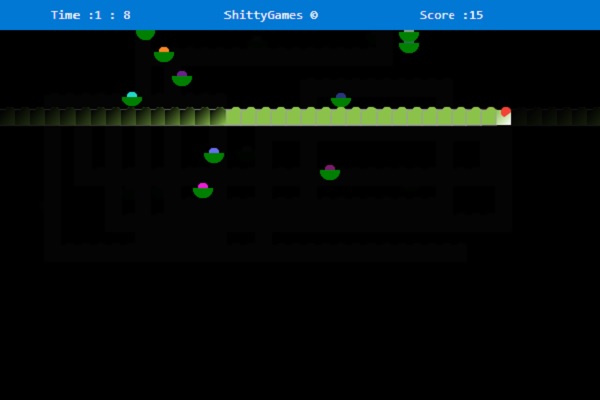
A good example of how to do animations using keyboard controls.
We will have a look at some advanced animation techniques and physics in the next chapter.