theme

类型 对象
Mandatory No
范例
"theme": {
  "images": {
    "theme_frame": "images/sun.jpg"
  },
  "colors": {
    "frame": "#CF723F",
    "tab_background_text": "#000"
  }
}
									

Use the theme key to define a static theme to apply to Firefox.

注意: If you want to include a theme with an extension, please see the theme API。

注意: Since May 2019, themes need to be signed to be installed ( bug 1545109 ).  See Signing and distributing your add-on 了解更多细节。

注意: A new version of Firefox for Android, based on GeckoView, is under development. A pre-release version is available. The pre-release version does not support themes.

Image formats

The following image formats are supported in all theme image properties:

  • JPEG
  • PNG
  • APNG
  • SVG (animated SVG is supported from Firefox 59)
  • GIF (animated GIF isn’t supported)

句法

The theme key is an object that takes the following properties:

名称 类型 描述
图像 对象

Optional as of Firefox 60. Mandatory before Firefox 60.

A JSON object whose properties represent the images to display in various parts of the browser. See images for details on the properties that this object can contain.

colors 对象

Mandatory.

A JSON object whose properties represent the colors of various parts of the browser. See colors for details on the properties that this object can contain.

properties 对象 可选

This object has two properties that affect how the "additional_backgrounds" images are displayed. See properties for details on the properties that this object can contain.

  • "additional_backgrounds_alignment": an array of enumeration values defining the alignment of the corresponding "additional_backgrounds": array item.
    alignment options include: "bottom" , "center" , "left" , "right" , "top" , "center bottom" , "center center" , "center top" , "left bottom" , "left center" , "left top" , "right bottom" , "right center" ,和 "right top" 。若非 specified, defaults to "right top" .
    可选
  • "additional_backgrounds_tiling": an array of enumeration values defining how the corresponding "additional_backgrounds": array item repeats, with 支持 "no-repeat" , "repeat" , "repeat-x" ,和 "repeat-y" 。若非 specified, defaults to "no-repeat" .
    可选

图像

All URLs are relative to the manifest.json file and cannot reference an external URL.

Images should be 200 pixels high to ensure they always fill the header space vertically.

名称 类型 描述
headerURL 字符串 警告: headerURL has been removed in Firefox 70. You will begin to get warnings in Firefox 65 and later if you load a theme that uses this property. Use theme_frame 代替。

The URL of a foreground image to be added to the header area and anchored to the upper right corner of the header area.

Optional in desktop Firefox from Firefox 60 onwards. One of theme_frame or headerURL had to be specified before Firefox 60. Note also that in Firefox 60 onwards, any text-shadow applied to the header text is removed if no headerURL is specified (see bug 1404688 ).

In Firefox for Android, headerURL or theme_frame   must be specified.

theme_frame 字符串 The URL of a foreground image to be added to the header area and anchored to the upper right corner of the header area.

注意: Chrome anchors the image to the top left of the header and if the image doesn’t fill the header area tile the 图像。

Optional in desktop Firefox 60 onwards. One of theme_frame or headerURL had to be specified before Firefox 60.

In Firefox for Android, headerURL or theme_frame   must be specified.

additional_backgrounds 数组 of 字符串

警告: additional_backgrounds property is experimental. It is currently accepted in release versions of Firefox, but its behavior is subject to change. It is not supported in Firefox for Android.

An array of URLs for additional background images to be added to the header area and displayed behind the "theme_frame": image. These images layer the first image in the array on top, the last image in the array at the bottom.

Optional.

By default all images are anchored to the upper right corner of the header area, but their alignment and repeat behavior can be controlled by properties of "properties": .

colors

These properties define the colors used for different parts of the browser. They are all optional (but note that "accentcolor" and "textcolor" were mandatory in Firefox before version 63).  How these properties affect the Firefox UI  is shown here:

Overview of the color properties and how they apply to Firefox UI components

注意: Where a component is affected by multiple color properties, the properties are listed in order of precedence.

All these properties can be specified as either a string containing any valid CSS color string (including hexadecimal), or an RGB array, such as "tab_background_text": [ 107 , 99 , 23 ] .

注意: In Chrome, colors may only be specified as RGB arrays .

In Firefox for Android colors can be specified using:

  • full hexadecimal notation, that is #RRGGBB only. alpha and shortened syntax, as in #RGB[A], are not supported.
  • Functional notation (RGB arrays) for themes targeting Firefox 68.2 or later.

Colors for Firefox for Android themes cannot be specified using color names.

名称 描述
accentcolor 警告: accentcolor has been removed in Firefox 70. You will begin to get warnings in Firefox 65 and later if you load a theme that uses this property. Use the frame 特性代替。

The color of the header area background, displayed in the part of the header not covered or visible through the images specified in "headerURL" and "additional_backgrounds" .

See example
"theme": {
  "colors": {
     "accentcolor": "red",
     "tab_background_text": "white"
  }
}
												

bookmark_text The color of text and icons in the bookmark and find bars. Also, if tab_text isn't defined it sets the color of the active tab text and if icons isn't defined the color of the toolbar icons. Provided as Chrome compatible alias for toolbar_text .

注意: Ensure any color used contrasts well with those used in frame and frame_inactive or toolbar if you're using that property.

Where icons isn't defined, also ensure good contrast with button_background_active and button_background_hover .

See example
"theme": {
  "colors": {
    "frame": "black",
    "tab_background_text": "white",
    "tab_text": "white",
    "toolbar": "black",
    "bookmark_text": "red"
  }
}
												

Example use of the bookmark_text color property

button_background_active

The color of the background of the pressed toolbar buttons.

See example
"theme": {
  "colors": {
     "frame": "black",
     "tab_background_text": "white",
     "button_background_active": "red"
  }
}
													

button_background_hover

The color of the background of the toolbar buttons on hover.

See example
"theme": {
  "colors": {
     "frame": "black",
     "tab_background_text": "white",
     "button_background_hover": "red"
  }
}
														

icons

The color of toolbar icons, excluding those in the find toolbar.

注意: Ensure the color used contrasts well with those used in frame frame_inactive , button_background_active ,和 button_background_hover .

See example
"theme": {
  "colors": {
     "frame": "black",
     "tab_background_text": "white",
     "icons": "red"
  }
}
															

icons_attention The color of toolbar icons in attention state such as the starred bookmark icon or finished download icon.

注意: Ensure the color used contrasts well with those used in frame frame_inactive , button_background_active ,和 button_background_hover .

See example
"theme": {
  "colors": {
     "frame": "black",
     "tab_background_text": "white",
     "icons_attention": "red"
  }
}
															

frame The color of the header area background, displayed in the part of the header not covered or visible through the images specified in "theme_frame" and "additional_backgrounds" .

See example
"theme": {
  "colors": {
     "frame": "red",
     "tab_background_text": "white"
  }
}
															

frame_inactive The color of the header area background when the browser window is inactive, displayed in the part of the header not covered or visible through the images specified in "theme_frame" and "additional_backgrounds" .

See example
"theme": {
  "colors": {
     "frame": "red",
     "frame_inactive": "gray",
     "tab_text": "white"
  }
}
															

Example use of the frame_inactive color property

ntp_background

The new tab page background color.

See example
"theme": {
  "colors": {
     "ntp_background": "red",
     "ntp_text": "white"
  }
}
																

ntp_text

The new tab page text color.

注意: Ensure the color used contrasts well with that used in ntp_background .

See example
"theme": {
  "colors": {
     "ntp_background": "red",
     "ntp_text": "white"
  }
}
																	

popup The background color of popups (such as the url bar dropdown and the arrow panels).

See example
"theme": {
  "colors": {
     "frame": "black",
     "tab_background_text": "white",
     "popup": "red"
  }
}
																	

popup_border

The border color of popups.

See example
"theme": {
  "colors": {
     "frame": "black",
     "tab_background_text": "white",
     "popup": "black",
     "popup_text": "white",
     "popup_border": "red"
  }
}
																		

popup_highlight The background color of items highlighted using the keyboard inside popups (such as the selected url bar dropdown item).

注意: It's recommended to define popup_highlight_text to override the browser default text color on various platforms.

See example
"theme": {
  "colors": {
     "frame": "black",
     "tab_background_text": "white",
     "popup_highlight": "red",
     "popup_highlight_text": "white"
  }
}
																		

popup_highlight_text

The text color of items highlighted inside popups.

注意: Ensure the color used contrasts well with that used in popup_highlight .

See example
"theme": {
  "colors": {
     "frame": "black",
     "tab_background_text": "white",
     "popup_highlight": "black",
     "popup_highlight_text": "red"
  }
}
																			

popup_text

The text color of popups.

注意: Ensure the color used contrasts well with that used in popup .

See example
"theme": {
  "colors": {
     "frame": "black",
     "tab_background_text": "white",
     "popup": "black",
     "popup_text": "red"
  }
}
																				

sidebar

The background color of the sidebar.

See example
"theme": {
  "colors": {
     "sidebar": "red",
     "sidebar_highlight": "white",
     "sidebar_highlight_text": "green",
     "sidebar_text": "white"
  }
}
																					

sidebar_border The border and splitter color of the browser sidebar

See example
"theme": {
  "colors": {
     "sidebar_border": "red"
  }
}
																					

sidebar_highlight The background color of highlighted rows in built-in sidebars

See example
"theme": {
  "colors": {
     "sidebar_highlight": "red",
     "sidebar_highlight_text": "white"
  }
}
																					

sidebar_highlight_text

The text color of highlighted rows in sidebars.

注意: Ensure the color used contrasts well with that used in sidebar_highlight .

See example
"theme": {
  "colors": {
    "sidebar_highlight": "pink",
    "sidebar_highlight_text": "red",
  }
}
																						

sidebar_text

The text color of sidebars.

注意: Ensure the color used contrasts well with that used in sidebar .

See example
"theme": {
  "colors": {
     "sidebar": "red",
     "sidebar_highlight": "white",
     "sidebar_highlight_text": "green",
     "sidebar_text": "white"
  }
}
																							

tab_background_separator 警告: tab_background_separator is not supported starting with Firefox 89.

The color of the vertical separator of the background tabs.

See example
"theme": {
  "colors": {
     "frame": "black",
     "tab_background_text": "white",
     "tab_background_separator": "red"
  }
}
																							

A closeup of browser tabs to highlight the separator.

tab_background_text The color of the text displayed in the inactive page tabs. If tab_text or bookmark_text isn't specified, applies to the active tab text.

注意: Ensure the color used contrasts well with those used in tab_selected or frame and frame_inactive .

See example
"theme": {
  "colors": {
    "frame": "black",
    "toolbar": "white",
    "tab_background_text": "red"
  }
}
																							

tab_line

The color of the selected tab line.

See example
"theme": {
  "colors": {
     "frame": "black",
     "tab_background_text": "white",
     "tab_line": "red"
  }
}
																								

tab_loading

The color of the tab loading indicator and the tab loading burst.

See example
"theme": {
  "colors": {
     "frame": "black",
     "tab_background_text": "white",
     "tab_loading": "red"
  }
}
																									

tab_selected The background color of the selected tab. When not in use selected tab color is set by frame frame_inactive .

See example
"theme": {
  "images": {
  "theme_frame": "weta.png"
},
  "colors": {
     "frame": "black",
     "tab_background_text": "white",
     "tab_selected": "red"
  }
}
																									

tab_text From Firefox 59, it represents the text color for the selected tab. If tab_line isn't specified, it also defines the color of the selected tab line.

注意: Ensure the color used contrasts well with those used in tab_selected or frame and frame_inactive .

From Firefox 55 to 58, it is incorrectly implemented as alias for "textcolor"

See example
"theme": {
  "images": {
  "theme_frame": "weta.png"
},
  "colors": {
     "frame": "black",
     "tab_background_text": "white",
     "tab_selected": "white",
     "tab_text": "red"
  }
}
																									

textcolor 警告: textcolor has been removed in Firefox 70. You will begin to get warnings in Firefox 65 and later if you load a theme that uses this property. Use tab_background_text 代替。

The color of the text displayed in the header area.

See example
"theme": {
  "colors": {
    "frame": "black",
    "toolbar": "white",
    "textcolor": "red"
  }
}
																									

toolbar The background color for the navigation bar, the bookmarks bar, and the selected tab.

This also sets the background color of the "Find" bar.

See example
"theme": {
  "colors": {
    "frame": "black",
    "toolbar": "red",
    "tab_background_text": "white"
  }
}
																									

toolbar_bottom_separator The color of the line separating the bottom of the toolbar from the region below.

See example
"theme": {
  "colors": {
    "frame": "black",
    "tab_background_text": "white",
    "toolbar_bottom_separator": "red"
  }
}
																									

toolbar_field

The background color for fields in the toolbar, such as the URL bar.

This also sets the background color of the Find in page 字段。

See example
"theme": {
  "colors": {
    "frame": "black",
    "tab_background_text": "white",
    "toolbar_field": "red"
  }
}
																										

toolbar_field_border

The border color for fields in the toolbar.

This also sets the border color of the Find in page 字段。

See example
"theme": {
  "colors": {
    "frame": "black",
    "toolbar": "black",
    "tab_background_text": "white",
    "toolbar_field": "black",
    "toolbar_field_text": "white",
    "toolbar_field_border": "red"
  }
}
																											

toolbar_field_border_focus

The focused border color for fields in the toolbar.

See example
"theme": {
  "colors": {
    "frame": "black",
    "toolbar": "black",
    "tab_background_text": "white",
    "toolbar_field": "black",
    "toolbar_field_text": "white",
    "toolbar_field_border_focus": "red"
  }
}
																												

toolbar_field_focus The focused background color for fields in the toolbar, such as the URL bar.

See example
"theme": {
  "colors": {
    "frame": "black",
    "toolbar": "black",
    "tab_background_text": "white",
    "toolbar_field": "black",
    "toolbar_field_text": "white",
    "toolbar_field_focus": "red"
  }
}
																												

toolbar_field_highlight The background color used to indicate the current selection of text in the URL bar (and the search bar, if it's configured to be separate).
See example
"theme": {
  "colors": {
    "toolbar_field": "rgba(255, 255, 255, 0.91)",
    "toolbar_field_text": "rgb(0, 100, 0)",
    "toolbar_field_highlight": "rgb(180, 240, 180, 0.9)",
    "toolbar_field_highlight_text": "rgb(0, 80, 0)"
  }
}
																													

Example showing customized text and highlight colors in the URL bar

在这里, toolbar_field_highlight field specifies that the highlight color is a light green, while the text is set to a dark-to-medium green using toolbar_field_highlight_text .

toolbar_field_highlight_text The color used to draw text that's currently selected in the URL bar (and the search bar, if it's configured to be separate box).

注意: Ensure the color used contrasts well with those used in toolbar_field_highlight .

See example
"theme": {
  "colors": {
    "toolbar_field": "rgba(255, 255, 255, 0.91)",
    "toolbar_field_text": "rgb(0, 100, 0)",
    "toolbar_field_highlight": "rgb(180, 240, 180, 0.9)",
    "toolbar_field_highlight_text": "rgb(0, 80, 0)"
  }
}
																													

Example showing customized text and highlight colors in the URL bar

在这里, toolbar_field_highlight_text field is used to set the text color to a dark medium-dark green, while the highlight color is  a light green.

toolbar_field_separator 警告: toolbar_field_separator is not supported starting with Firefox 89.

The color of separators inside the URL bar. In Firefox 58 this was implemented as toolbar_vertical_separator .

See example
"theme": {
  "colors": {
    "frame": "black",
    "toolbar": "black",
    "tab_background_text": "white",
    "toolbar_field_separator": "red"
  }
}
																													

In this screenshot, "toolbar_vertical_separator" 是 white vertical line in the URL bar dividing the Reader Mode icon from the other icons.

toolbar_field_text The color of text in fields in the toolbar, such as the URL bar. This also sets the color of text in the Find in page 字段。

注意: Ensure the color used contrasts well with those used in toolbar_field .

See example
"theme": {
  "colors": {
    "frame": "black",
    "toolbar": "black",
    "tab_background_text": "white",
    "toolbar_field": "black",
    "toolbar_field_text": "red"
  }
}
																													

toolbar_field_text_focus The color of text in focused fields in the toolbar, such as the URL bar.

注意: Ensure the color used contrasts well with those used in toolbar_field_focus .

See example
"theme": {
  "colors": {
    "frame": "black",
    "toolbar": "black",
    "tab_background_text": "white",
    "toolbar_field": "black",
    "toolbar_field_text": "white",
    "toolbar_field_text_focus": "red"
  }
}
																													

toolbar_text The color of toolbar text. This also sets the color of  text in the "Find" bar.

注意: For compatibility with Chrome, use the alias bookmark_text .

See example
"theme": {
  "colors": {
    "frame": "black",
    "tab_background_text": "white",
    "toolbar": "black",
    "toolbar_text": "red"
  }
}
																													

toolbar_top_separator The color of the line separating the top of the toolbar from the region above.

See example
"theme": {
  "colors": {
    "frame": "black",
    "tab_background_text": "white",
    "toolbar": "black",
    "toolbar_top_separator": "red"
  }
}
																													

toolbar_vertical_separator The color of the separator in the bookmarks toolbar. In Firefox 58, it corresponds to the color of separators inside the URL bar.

See example
"theme": {
  "colors": {
    "frame": "black",
    "tab_background_text": "white",
    "toolbar": "black",
    "toolbar_vertical_separator": "red"
  }
}
																													

别名

Additionally, this key accepts various properties that are aliases for one of the properties above. These are provided for compatibility with Chrome. If an alias is given, and the non-alias version is also given, then the value will be taken from the non-alias version.

警告: Beginning Firefox 70, the following properties are removed: accentcolor and textcolor 。使用 frame and tab_background_text instead. Using these values in themes loaded into Firefox 65 or later will raise warnings.

名称 别名化的
bookmark_text toolbar_text
frame accentcolor
frame_inactive accentcolor
tab_background_text textcolor

properties

名称 类型 描述
additional_backgrounds_alignment 数组 of 字符串

Optional.

An array of enumeration values defining the alignment of the corresponding "additional_backgrounds": array item.
alignment options include:

  • "bottom"
  • "center"
  • "left"
  • "right"
  • "top"
  • "center bottom"
  • "center center"
  • "center top"
  • "left bottom"
  • "left center"
  • "left top"
  • "right bottom"
  • "right center"
  • "right top" .

If not specified, defaults to "right top" .

additional_backgrounds_tiling 数组 of 字符串

Optional.

An array of enumeration values defining how the corresponding "additional_backgrounds": array item repeats. Options include:

  • "no-repeat"
  • "repeat"
  • "repeat-x"
  • "repeat-y"

If not specified, defaults to "no-repeat" .

范例

A basic theme must define an image to add to the header, the accent color to use in the header, and the color of text used in the header:

 "theme": {
   "images": {
     "theme_frame": "images/sun.jpg"
   },
   "colors": {
     "frame": "#CF723F",
     "tab_background_text": "#000"
   }
 }


Multiple images can be used to fill the header. Before Firefox version 60, use a blank or transparent header image to gain control over the placement of each additional image:

 "theme": {
   "images": {
     "additional_backgrounds": [ "images/left.png" , "images/middle.png", "images/right.png"]
   },
   "properties": {
     "additional_backgrounds_alignment": [ "left top" , "top", "right top"]
   },
   "colors": {
     "frame": "blue",
     "tab_background_text": "#ffffff"
   }
 }


You can also fill the header with a repeated image, or images, in this case a single image anchored in the middle top of the header and repeated across the rest of the header:

 "theme": {
   "images": {
     "additional_backgrounds": [ "images/logo.png"]
   },
   "properties": {
     "additional_backgrounds_alignment": [ "top" ],
     "additional_backgrounds_tiling": [ "repeat"  ]
   },
   "colors": {
     "frame": "green",
     "tab_background_text": "#000"
   }
 }


The following example uses most of the different values for theme.colors :

  "theme": {
    "images": {
      "theme_frame": "weta.png"
    },
    "colors": {
       "frame": "darkgreen",
       "tab_background_text": "white",
       "toolbar": "blue",
       "bookmark_text": "cyan",
       "toolbar_field": "orange",
       "toolbar_field_border": "white",
       "toolbar_field_text": "green",
       "toolbar_top_separator": "red",
       "toolbar_bottom_separator": "white",
       "toolbar_vertical_separator": "white"
    }
  }


It will give you a browser that looks like this:
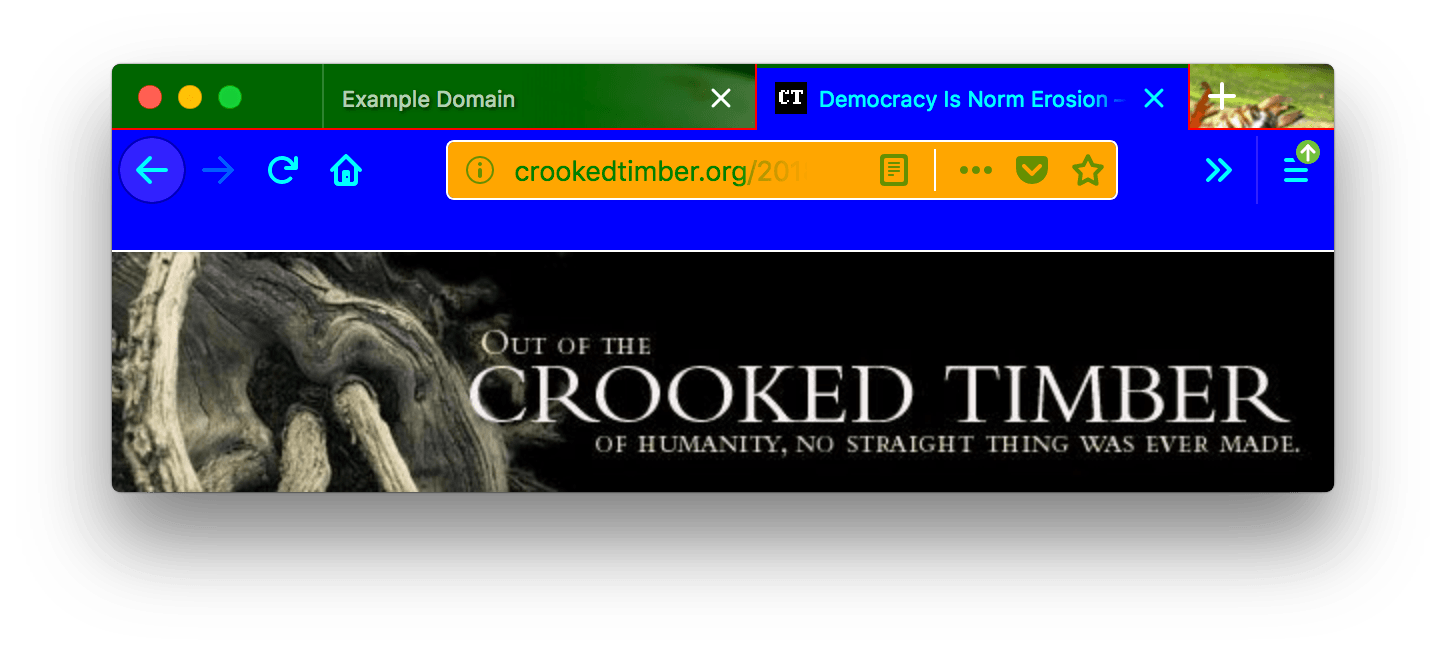
In this screenshot, "toolbar_vertical_separator" is the white vertical line in the URL bar dividing the Reader Mode icon from the other icons.

浏览器兼容性

BCD tables only load in the browser

Chrome compatibility

In Chrome:

  • colors/toolbar_text is not used, use colors/bookmark_text 代替。
  • images/theme_frame anchors the image to the top left of the header and if the image doesn’t fill the header area tile the image.
  • all colors must be specified as an array of RGB values, like this:
    "theme": {
      "colors": {
         "frame": [255, 0, 0],
         "tab_background_text": [0, 255, 0],
         "bookmark_text": [0, 0, 255]
      }
    }
    
    																													
    From Firefox 59 onward, both the array form and the CSS color form are accepted for all properties. Before that, colors/frame and colors/tab_background_text required the array form, while other properties required the CSS color form.

Found a problem with this page?

最后修改: , 由 MDN 贡献者

  1. 浏览器扩展名
  2. 快速入门
    1. What are extensions?
    2. Your first extension
    3. Your second extension
    4. Anatomy of an extension
    5. Example extensions
    6. What next?
  3. 概念
    1. Using the JavaScript APIs
    2. Content scripts
    3. Match patterns
    4. Working with files
    5. 国际化
    6. Content Security Policy
    7. Native messaging
    8. Differences between API implementations
    9. Chrome incompatibilities
  4. 用户界面
    1. 用户界面
    2. Toolbar button
    3. Address bar button
    4. Sidebars
    5. Context menu items
    6. Options page
    7. Extension pages
    8. Notifications
    9. Address bar suggestions
    10. Developer tools panels
  5. 如何
    1. Intercept HTTP requests
    2. Modify a web page
    3. Insert external content
    4. Share objects with page scripts
    5. Add a button to the toolbar
    6. Implement a settings page
    7. Work with the Tabs API
    8. Work with the Bookmarks API
    9. Work with the Cookies API
    10. Work with contextual identities
    11. Interact with the clipboard
    12. Build a cross-browser extension
  6. Firefox differentiators
  7. JavaScript API
    1. Browser support for JavaScript APIs
    2. alarms
    3. bookmarks
    4. browserAction
    5. browserSettings
    6. browsingData
    7. captivePortal
    8. clipboard
    9. 命令
    10. contentScripts
    11. contextualIdentities
    12. Cookie
    13. devtools
    14. dns
    15. downloads
    16. events
    17. extension
    18. extensionTypes
    19. find
    20. history
    21. i18n
    22. identity
    23. idle
    24. management
    25. menus
    26. notifications
    27. omnibox
    28. pageAction
    29. permissions
    30. pkcs11
    31. privacy
    32. proxy
    33. runtime
    34. search
    35. sessions
    36. sidebarAction
    37. storage
    38. tabs
    39. theme
    40. topSites
    41. 类型
    42. userScripts
    43. webNavigation
    44. webRequest
    45. windows
  8. Manifest keys
    1. 介绍
    1. 作者
    2. background
    3. browser_action
    4. browser_specific_settings
    5. chrome_settings_overrides
    6. chrome_url_overrides
    7. 命令
    8. content_scripts
    9. content_security_policy
    10. default_locale
    11. description
    12. developer
    13. devtools_page
    14. dictionaries
    15. externally_connectable
    16. homepage_url
    17. icons
    18. incognito
    19. manifest_version
    20. name
    21. offline_enabled
    22. omnibox
    23. optional_permissions
    24. options_page
    25. options_ui
    26. page_action
    27. permissions
    28. protocol_handlers
    29. short_name
    30. sidebar_action
    31. storage
    32. theme
    33. theme_experiment
    34. user_scripts
    35. version
    36. version_name
    37. web_accessible_resources
  9. Extension Workshop
    1. Develop
    2. Publish
    3. Manage
    4. Enterprise
  10. Contact us
  11. Channels
    1. Add-ons blog
    2. Add-ons forum
    3. Add-ons chat
