JavaScript API

JavaScript APIs for WebExtensions can be used inside the extension's background scripts and in any other documents bundled with the extension, including browser action or page action popups, sidebars , options pages ,或 new tab pages . A few of these APIs can also be accessed by an extension's content scripts . (See the list in the content script guide )。

To use the more powerful APIs, you need to request permission in your extension's manifest.json .

You can access the APIs using the 浏览器 名称空间:

function logTabs(tabs) {
  console.log(tabs)
}
browser.tabs.query({currentWindow: true}, logTabs)


Many of the APIs are asynchronous, returning a Promise :

function logCookie(c) {
  console.log(c)
}
function logError(e) {
  console.error(e)
}
let setCookie = browser.cookies.set(
  {url: "https://developer.mozilla.org/"}
);
setCookie.then(logCookie, logError)


Browser API differences

Note that this is different from Google Chrome's extension system, which uses the chrome namespace instead of 浏览器 , and which uses callbacks instead of promises for asynchronous functions. As a porting aid, the Firefox implementation of WebExtensions APIs supports chrome and callbacks as well as 浏览器 and promises. Mozilla has also written a polyfill which enables code that uses 浏览器 and promises to work unchanged in Chrome: https://github.com/mozilla/webextension-polyfill .

Firefox also implements these APIs under the chrome namespace using callbacks. This allows code written for Chrome to run largely unchanged in Firefox for the APIs documented here.

Microsoft Edge uses the 浏览器 namespace, but doesn't yet support promise-based asynchronous APIs. In Edge, for the time being, asynchronous APIs must use callbacks.

Not all browsers support all the APIs: for the details, see Browser support for JavaScript APIs and Chrome incompatibilities .

范例

Throughout the JavaScript API listings, you will find short code examples that illustrate how the API is used. You can experiment using these examples— without needing to create a web extension—using the console in the Toolbox .

For example, here is the first code example on this page running in the Toolbox console in Firefox Developer Edition:
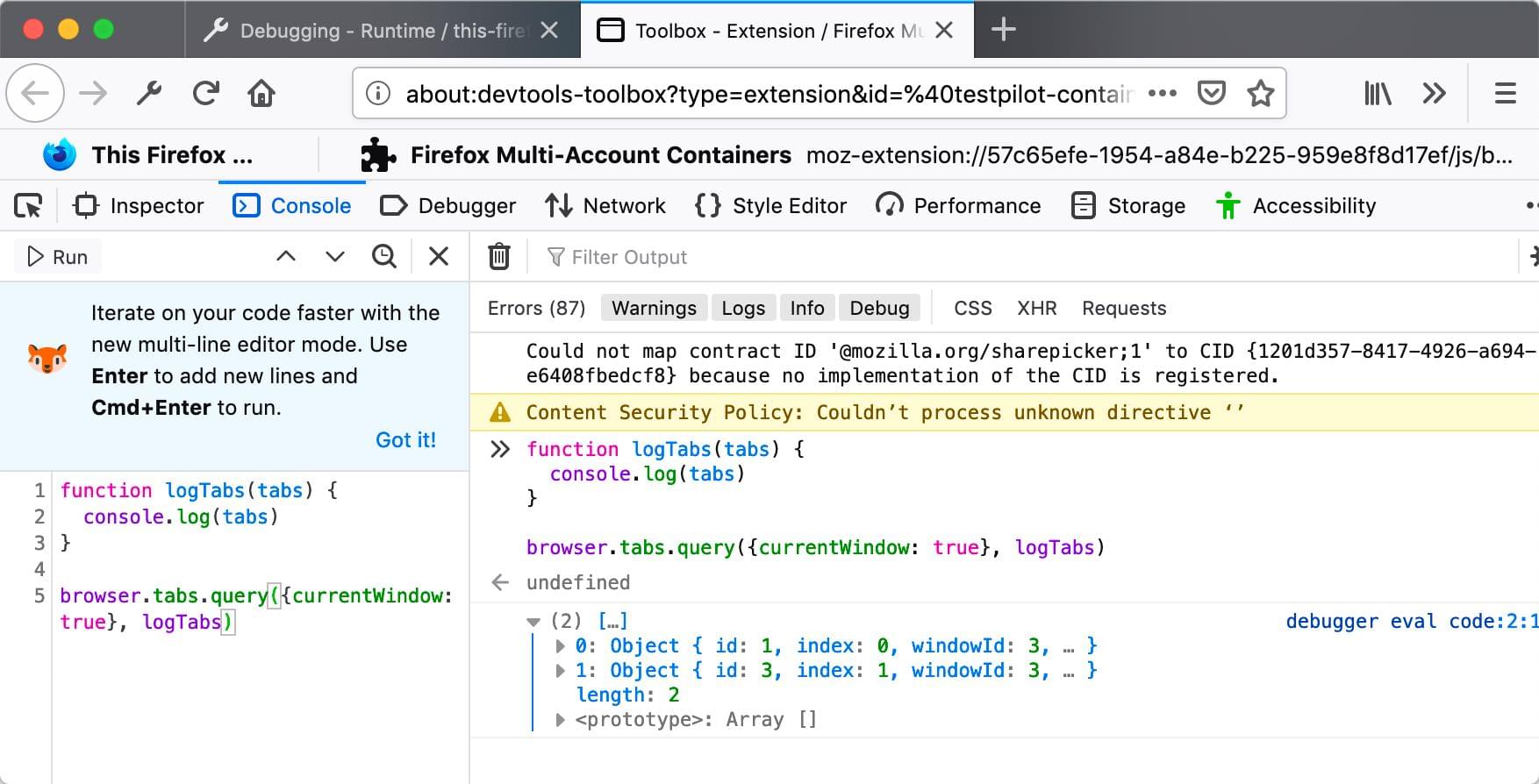
Illustration of a snippet of web extension code run from the console in the Toolbox

JavaScript API listing

See below for a complete list of JavaScript APIs:

alarms
Schedule code to run at a specific time in the future. This is like setTimeout() and setInterval() , except that those functions don't work with background pages that are loaded on demand.
bookmarks
WebExtensions bookmarks API lets an extension interact with and manipulate the browser's bookmarking system. You can use it to bookmark pages, retrieve existing bookmarks, and edit, remove, and organize bookmarks.
browserAction
Adds a button to the browser's toolbar.
browserSettings
Enables an extension to modify certain global browser settings. Each property of this API is a types.BrowserSetting object, providing the ability to modify a particular setting.
browsingData
Enables extensions to clear the data that is accumulated while the user is browsing.
captivePortal
Determine the captive portal state of the user’s connection. A captive portal is a web page displayed when a user first connects to a Wi-Fi network. The user provides information or acts on the captive portal web page to gain broader access to network resources, such as accepting terms and conditions or making a payment.
clipboard
The WebExtension clipboard API (which is different from the standard Clipboard API ) enables an extension to copy items to the system clipboard. Currently the WebExtension clipboard API only supports copying images, but it's intended to support copying text and HTML in the future.
命令
Listen for the user executing commands that you have registered using the 命令 manifest.json key .
contentScripts
Use this API to register content scripts. Registering a content script instructs the browser to insert the given content scripts into pages that match the given URL patterns.
contextualIdentities
Work with contextual identities: list, create, remove, and update contextual identities.
Cookie
Enables extensions to get and set cookies, and be notified when they change.
devtools
Enables extensions to interact with the browser's Developer Tools. You can use this API to create Developer Tools pages, interact with the window that is being inspected, inspect the page network usage.
dns
Enables an extension to resolve domain names.
downloads
Enables extensions to interact with the browser's download manager. You can use this API module to download files, cancel, pause, resume downloads, and show downloaded files in the file manager.
events
Common types used by APIs that dispatch events.
extension
Utilities related to your extension. Get URLs to resources packages with your extension. Get the Window object for your extension's pages. Get the values for various settings.
extensionTypes
Some common types used in other WebExtension APIs.
find
Finds text in a web page, and highlights matches.
history
使用 history API to interact with the browser history.
i18n
Functions to internationalize your extension. You can use these APIs to get localized strings from locale files packaged with your extension, find out the browser's current language, and find out the value of its Accept-Language header .
identity
Use the identity API to get an OAuth2 authorization code or access token, which an extension can then use to access user data from a service that supports OAuth2 access (such as Google or Facebook).
idle
Find out when the user's system is idle, locked, or active.
management
Get information about installed add-ons.
menus
Add items to the browser's menu system.
notifications
Display notifications to the user, using the underlying operating system's notification mechanism. Because this API uses the operating system's notification mechanism, the details of how notifications appear and behave may differ according to the operating system and the user's settings.
omnibox
Enables extensions to implement customized behavior when the user types into the browser's address bar.
pageAction
A page action is a clickable icon inside the browser's address bar.
permissions
Enables extensions to request extra permissions at runtime, after they have been installed.
pkcs11
pkcs11 API enables an extension to enumerate PKCS #11 security modules and to make them accessible to the browser as sources of keys and certificates.
privacy
Access and modify various privacy-related browser settings.
proxy
Use the proxy API to proxy web requests. You can use the proxy.onRequest event listener to intercept web requests, and return an object that describes whether and how to proxy them.
runtime
This module provides information about your extension and the environment it's running in.
search
Retrieves search engines and executes a search with a specific search engine.
sessions
Use the sessions API to list, and restore, tabs and windows that have been closed while the browser has been running.
sidebarAction
Gets and sets properties of an extension's sidebar.
storage
Enables extensions to store and retrieve data, and listen for changes to stored items.
tabs
Interact with the browser's tab system.
theme
Enables browser extensions to update the browser theme.
topSites
Use the topSites API to get an array containing pages that the user has visited frequently.
类型
定义 BrowserSetting type, which is used to represent a browser setting.
userScripts
Use this API to register user scripts, third-party scripts designed to manipulate webpages or provide new features. Registering a user script instructs the browser to attach the script to pages that match the URL patterns specified during registration.
webNavigation
Add event listeners for the various stages of a navigation. A navigation consists of a frame in the browser transitioning from one URL to another, usually (but not always) in response to a user action like clicking a link or entering a URL in the location bar.
webRequest
Add event listeners for the various stages of making an HTTP request, which includes websocket requests on ws:// and wss:// . The event listener receives detailed information about the request and can modify or cancel the request.
windows
Interact with browser windows. You can use this API to get information about open windows and to open, modify, and close windows. You can also listen for window open, close, and activate events.

Found a problem with this page?

最后修改: , 由 MDN 贡献者

  1. 浏览器扩展名
  2. 快速入门
    1. What are extensions?
    2. Your first extension
    3. Your second extension
    4. Anatomy of an extension
    5. Example extensions
    6. What next?
  3. 概念
    1. Using the JavaScript APIs
    2. Content scripts
    3. Match patterns
    4. Working with files
    5. 国际化
    6. Content Security Policy
    7. Native messaging
    8. Differences between API implementations
    9. Chrome incompatibilities
  4. 用户界面
    1. 用户界面
    2. Toolbar button
    3. Address bar button
    4. Sidebars
    5. Context menu items
    6. Options page
    7. Extension pages
    8. Notifications
    9. Address bar suggestions
    10. Developer tools panels
  5. 如何
    1. Intercept HTTP requests
    2. Modify a web page
    3. Insert external content
    4. Share objects with page scripts
    5. Add a button to the toolbar
    6. Implement a settings page
    7. Work with the Tabs API
    8. Work with the Bookmarks API
    9. Work with the Cookies API
    10. Work with contextual identities
    11. Interact with the clipboard
    12. Build a cross-browser extension
  6. Firefox differentiators
  7. JavaScript API
    1. Browser support for JavaScript APIs
    2. alarms
    3. bookmarks
    4. browserAction
    5. browserSettings
    6. browsingData
    7. captivePortal
    8. clipboard
    9. 命令
    10. contentScripts
    11. contextualIdentities
    12. Cookie
    13. devtools
    14. dns
    15. downloads
    16. events
    17. extension
    18. extensionTypes
    19. find
    20. history
    21. i18n
    22. identity
    23. idle
    24. management
    25. menus
    26. notifications
    27. omnibox
    28. pageAction
    29. permissions
    30. pkcs11
    31. privacy
    32. proxy
    33. runtime
    34. search
    35. sessions
    36. sidebarAction
    37. storage
    38. tabs
    39. theme
    40. topSites
    41. 类型
    42. userScripts
    43. webNavigation
    44. webRequest
    45. windows
  8. Manifest keys
    1. 介绍
    1. 作者
    2. background
    3. browser_action
    4. browser_specific_settings
    5. chrome_settings_overrides
    6. chrome_url_overrides
    7. 命令
    8. content_scripts
    9. content_security_policy
    10. default_locale
    11. description
    12. developer
    13. devtools_page
    14. dictionaries
    15. externally_connectable
    16. homepage_url
    17. icons
    18. incognito
    19. manifest_version
    20. name
    21. offline_enabled
    22. omnibox
    23. optional_permissions
    24. options_page
    25. options_ui
    26. page_action
    27. permissions
    28. protocol_handlers
    29. short_name
    30. sidebar_action
    31. storage
    32. theme
    33. theme_experiment
    34. user_scripts
    35. version
    36. version_name
    37. web_accessible_resources
  9. Extension Workshop
    1. Develop
    2. Publish
    3. Manage
    4. Enterprise
  10. Contact us
  11. Channels
    1. Add-ons blog
    2. Add-ons forum
    3. Add-ons chat
