Add event listeners for the various stages of making an HTTP request, which includes websocket requests on
ws://
and
wss://
. The event listener receives detailed information about the request and can modify or cancel the request.
Each event is fired at a particular stage of the request. The typical sequence of events is like this:
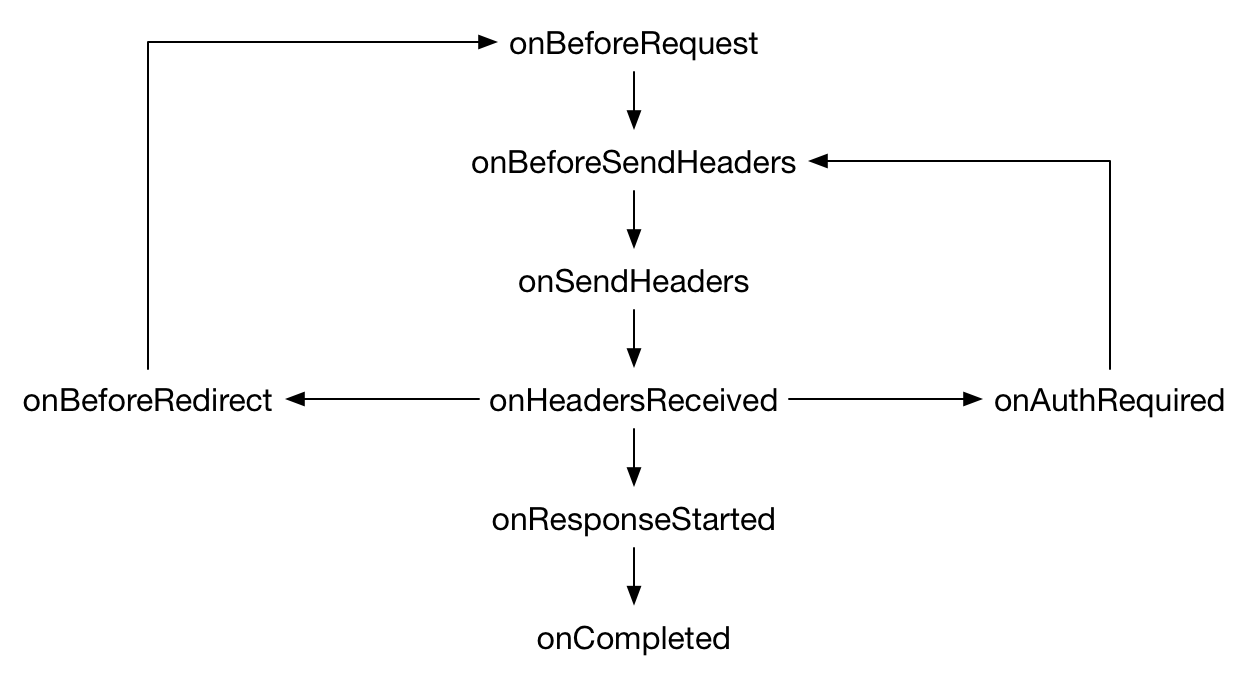
onErrorOccurred
can be fired at any time during the request. Also, note that sometimes the sequence of events may differ from this: for example, in Firefox, on an
HSTS
upgrade, the
onBeforeRedirect
event will be triggered immediately after
onBeforeRequest
.
All events—
except
onErrorOccurred
—can take three arguments to
addListener()
:
filter
object, so you can only be notified for requests made to particular URLs or for particular types of resource
extraInfoSpec
object. You can use this to pass additional event-specific instructions.
The listener function is passed a
details
object containing information about the request. This includes a request ID, which is provided to enable an add-on to correlate events associated with a single request. It is unique within a browser session and the add-on's context. It stays the same throughout a request, even across redirections and authentication exchanges.
要使用
webRequest
API for a given host, an extension must have the
"webRequest"
API permission
和
host permission
for that host. To use the
"blocking"
feature, the extension must also have the
"webRequestBlocking"
API permission.
To intercept resources loaded by a page (such as images, scripts, or stylesheets), the extension must have the host permission for the resource as well as for the main page requesting the resource. For example, if a page at
https://developer.mozilla.org
loads an image from
https://mdn.mozillademos.org
, then an extension must have both host permissions if it is to intercept the image request.
On some of these events, you can modify the request. Specifically, you can:
To do this, you need to pass an option with the value
"blocking"
在
extraInfoSpec
argument to the event's
addListener()
. This makes the listener synchronous.
In the listener, you can then return a
BlockingResponse
object, which indicates the modification you need to make: for example, the modified request header you want to send.
在
onHeadersReceived
listener you can access the
TLS
properties of a request by calling
getSecurityInfo()
. To do this you must also pass "blocking" in the
extraInfoSpec
argument to the event's
addListener()
.
You can read details of the TLS handshake, but can't modify them or override the browser's trust decisions.
To modify the HTTP response bodies for a request, call
webRequest.filterResponseData
, passing it the ID of the request. This returns a
webRequest.StreamFilter
object that you can use to examine and modify the data as it is received by the browser.
To do this, you must have the
"webRequestBlocking"
API permission as well as the
"webRequest"
API permission
和
host permission
for the relevant host.
webRequest.BlockingResponse
An object of this type is returned by event listeners that have set
"blocking"
in their
extraInfoSpec
argument. By setting particular properties in
BlockingResponse
, the listener can modify network requests.
webRequest.CertificateInfo
An object describing a single X.509 certificate.
webRequest.HttpHeaders
An array of HTTP headers. Each header is represented as an object with two properties:
名称
and either
value
or
binaryValue
.
webRequest.RequestFilter
An object describing filters to apply to
webRequest
事件。
webRequest.ResourceType
Represents a particular kind of resource fetched in a web request.
webRequest.SecurityInfo
An object describing the security properties of a particular web request.
webRequest.StreamFilter
An object that can be used to monitor and modify HTTP responses while they are being received.
webRequest.UploadData
Contains data uploaded in a URL request.
webRequest.MAX_HANDLER_BEHAVIOR_CHANGED_CALLS_PER_10_MINUTES
The maximum number of times that
handlerBehaviorChanged()
can be called in a 10 minute period.
webRequest.handlerBehaviorChanged()
This method can be used to ensure that event listeners are applied correctly when pages are in the browser's in-memory cache.
webRequest.filterResponseData()
返回
webRequest.StreamFilter
object for a given request.
webRequest.getSecurityInfo()
Gets detailed information about the TLS connection associated with a given request.
webRequest.onBeforeRequest
Fired when a request is about to be made, and before headers are available. This is a good place to listen if you want to cancel or redirect the request.
webRequest.onBeforeSendHeaders
Fired before sending any HTTP data, but after HTTP headers are available. This is a good place to listen if you want to modify HTTP request headers.
webRequest.onSendHeaders
Fired just before sending headers. If your add-on or some other add-on modified headers in
, you'll see the modified version here.
onBeforeSendHeaders
webRequest.onHeadersReceived
Fired when the HTTP response headers associated with a request have been received. You can use this event to modify HTTP response headers.
webRequest.onAuthRequired
Fired when the server asks the client to provide authentication credentials. The listener can do nothing, cancel the request, or supply authentication credentials.
webRequest.onResponseStarted
Fired when the first byte of the response body is received. For HTTP requests, this means that the status line and response headers are available.
webRequest.onBeforeRedirect
Fired when a server-initiated redirect is about to occur.
webRequest.onCompleted
Fired when a request is completed.
webRequest.onErrorOccurred
Fired when an error occurs.
BCD tables only load in the browser
Additional notes on Chrome incompatibilities .
注意:
This API is based on Chromium's
chrome.webRequest
API. This documentation is derived from
web_request.json
in the Chromium code.
Microsoft Edge compatibility data is supplied by Microsoft Corporation and is included here under the Creative Commons Attribution 3.0 United States License.
最后修改: , 由 MDN 贡献者
