Notifications allow you to communicate information about your extension or its content using the underlying operating system's notification service.
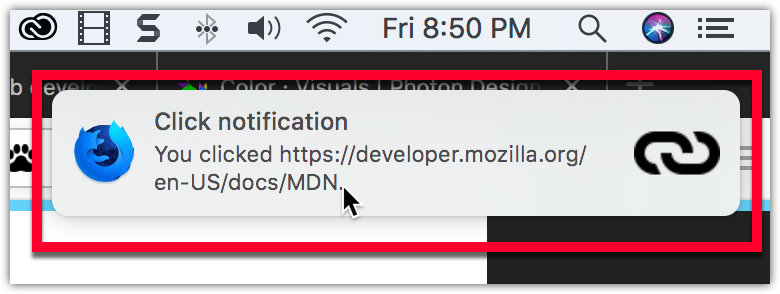
Notifications can include a call to action for the user, and your add-on can listen for the user clicking the notification or the notification closing.
You manage notifications programmatically, using the
notifications
API. To use this API you must request the
notifications
permission in your manifest.json:
"permissions": ["notifications"]
You then use
notifications.create
to create your notifications, as in this example from
notify-link-clicks-i18n:
var title = browser.i18n.getMessage("notificationTitle");
var content = browser.i18n.getMessage("notificationContent", message.url);
browser.notifications.create({
  "type": "basic",
  "iconUrl": browser.extension.getURL("icons/link-48.png"),
  "title": title,
  "message": content
});
This code creates a notification with an icon, title, and message.
If the notification includes a call to action, you can listen for the user clicking the notification to call the function to handle the action:
browser.notifications.onClicked.addListener(handleClick);
If you are issuing calls to action through notifications, you will also want to define the optional notification
id
, so you can figure out which call to action the user has selected.
For details on how to create icons to use with your notification, see Iconography 在 Photon Design System 文档编制。
webextensions-examples repository on GitHub includes the notify-link-clicks-i18n example which implements notifications.
最后修改: , 由 MDN 贡献者
