Add event listeners for the various stages of a navigation. A navigation consists of a frame in the browser transitioning from one URL to another, usually (but not always) in response to a user action like clicking a link or entering a URL in the location bar.
Compared with the
webRequest
API: navigations usually result in the browser making web requests, but the webRequest API is concerned with the lower-level view from the HTTP layer, while the webNavigation API is more concerned with the view from the browser UI itself.
Each event corresponds to a particular stage in the navigation. The sequence of events is like this:
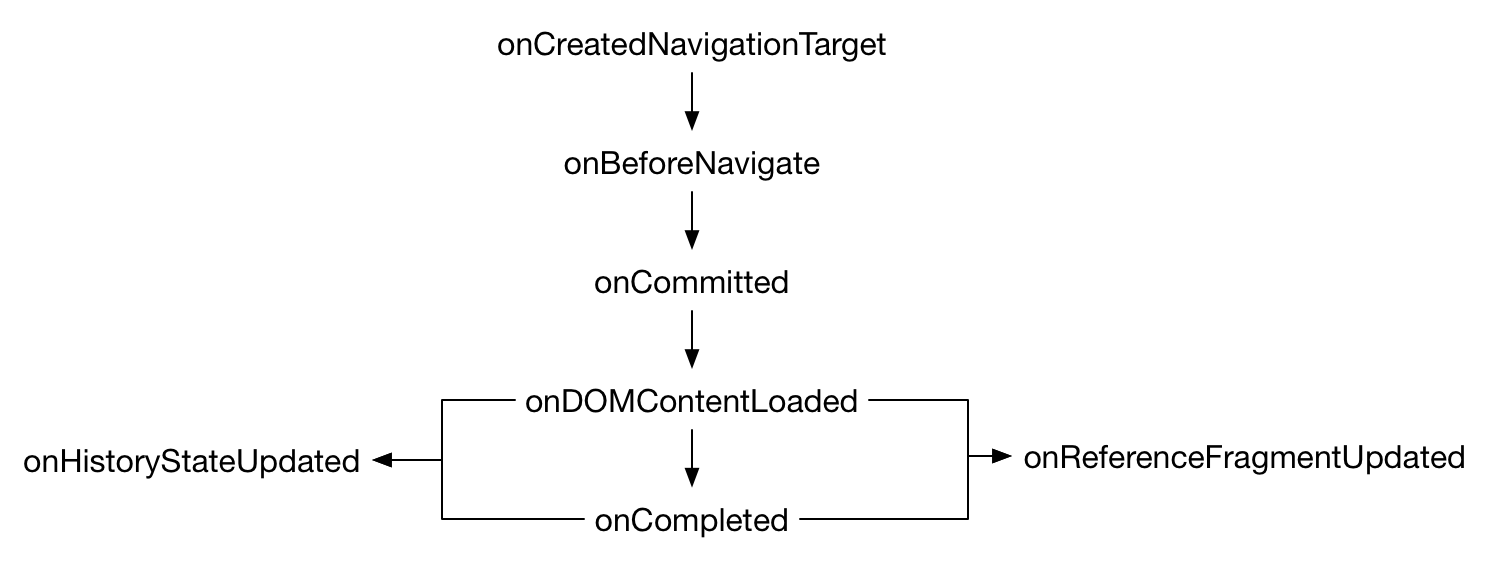
onCreatedNavigationTarget
is fired before
onBeforeNavigate
if the browser needed to create a new tab or window for the navigation (for example, because the user opened a link in a new tab).
onHistoryStateUpdated
is fired if a page uses the
history API
to update the URL displayed in the browser's location bar.
onReferenceFragmentUpdated
is fired if the
fragment identifier
for a page is changed.
onErrorOccurred
can be fired at any point.
Each navigation is a URL transition in a particular browser frame. The browser frame is identified by a tab ID and a frame ID. The frame may be the top-level browsing context in the tab, or may be a nested browsing context implemented as an iframe .
Each event's
addListener()
call accepts an optional filter parameter. The filter will specify one or more URL patterns, and the event will then only be fired for navigations in which the target URL matches one of the patterns.
onCommitted
event listener is passed two additional properties: a
TransitionType
indicating the cause of the navigation (for example, because the user clicked a link, or because the user selected a bookmark), and a
TransitionQualifier
providing further information about the navigation.
To use this API you need to have the "webNavigation" permission .
webNavigation.TransitionType
Cause of the navigation: for example, the user clicked a link, or typed an address, or clicked a bookmark.
webNavigation.TransitionQualifier
Extra information about a transition.
webNavigation.getFrame()
Retrieves information about a particular frame. A frame may be the top-level frame in a tab or a nested iframe , and is uniquely identified by a tab ID and a frame ID.
webNavigation.getAllFrames()
Given a tab ID, retrieves information about all the frames it contains.
webNavigation.onBeforeNavigate
Fired when the browser is about to start a navigation event.
webNavigation.onCommitted
Fired when a navigation is committed. At least part of the new document has been received from the server and the browser has decided to switch to the new document.
webNavigation.onDOMContentLoaded
被激发当 DOMContentLoaded event is fired in the page.
webNavigation.onCompleted
Fired when a document, including the resources it refers to, is completely loaded and initialized. This is equivalent to the DOM
load
事件。
webNavigation.onErrorOccurred
Fired when an error occurs and the navigation is aborted. This can happen if either a network error occurred, or the user aborted the navigation.
webNavigation.onCreatedNavigationTarget
Fired when a new window, or a new tab in an existing window, is created to host a navigation: for example, if the user opens a link in a new tab.
webNavigation.onReferenceFragmentUpdated
Fired if the fragment identifier for a page is changed.
webNavigation.onTabReplaced
Fired when the contents of the tab is replaced by a different (usually previously pre-rendered) tab.
webNavigation.onHistoryStateUpdated
Fired when the page used the history API to update the URL displayed in the browser's location bar.
BCD tables only load in the browser
注意:
This API is based on Chromium's
chrome.webNavigation
API. This documentation is derived from
web_navigation.json
in the Chromium code.
Microsoft Edge compatibility data is supplied by Microsoft Corporation and is included here under the Creative Commons Attribution 3.0 United States License.
最后修改: , 由 MDN 贡献者
